
Three months ago, I had never made a single AI video in my life. Today I generate AI character videos almost every day — and I’ve tested every major tool so you don’t have to. This guide is written by a real beginner, for beginners. No fluff, no paid placements — just honest opinions on what actually works in 2026.
The AI video generation market is exploding. What used to require a film crew, expensive software, and weeks of editing can now be done in minutes with a text prompt. But with dozens of tools out there, choosing the right one is overwhelming — especially as a beginner.
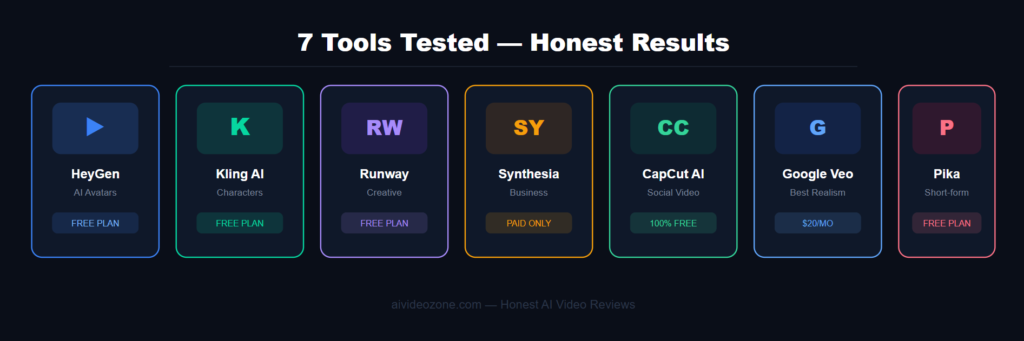
I’ve spent the last few months testing these tools hands-on, and in this guide I’ll break down the 7 best AI video tools in 2026, who each one is best for, and which ones are actually worth your money.
💡 Quick tip
Not all AI video tools are the same. Some AI video tools make videos from what you describe. Other AI video tools make AI avatars or people that can speak or read what you want. I will tell you what kind of AI video tool each one is so you can choose the AI video tool for what you need to do with the AI video tool.
The 7 Best AI Video Tools in 2026
#1 Google Veo 3.1
Google’s Veo 3.1 is currently the most capable all-around text-to-video model available to the public.What is special about Googles Veo 3.1 is that it does a job of following what you tell it to do. If you describe a scene with a lot of details, like what the lighting looks like how the camera moves and what the textures are Googles Veo 3.1 will make a video that looks like that.Googles Veo 3.1 can also make videos. Sounds at the same time. So when you use Googles Veo 3.1 you get the sounds and music that go with the video automatically.
My honest opinion: The quality is genuinely impressive, especially for cinematic scenes. It’s not the easiest to access for beginners (available via Google Flow), but the results speak for themselves. If realism is your goal, this is the tool to beat in 2026.
- Best realism
- Built-in audio
- Text-to-video
- Not beginner-friendly
 From $20/month via Google One AI Premium
# 2 Kling AI 3.0
Kling 3.0 sits at the top of benchmark rankings for pure video generation quality. It scored 8.4/10 for visual fidelity in independent 2026 testing — the highest in the field. What sets it apart for character work is its temporal consistency: it keeps characters and objects looking the same across the entire clip, which is the biggest challenge in AI video. It also handles realistic human motion better than most competitors.
My honest opinion: This is the tool I personally use most for AI character video. The results are stunning for the price. The free tier is limited, but the paid plan at around $10/month is excellent value for what you get.
- Best character consistency
- Affordable
- Free tier available
Free tier available | Paid from ~$10/month# 3 HeyGen
HeyGen has carved out a clear niche: personalized AI avatar videos at scale. It’s the go-to tool for creators who want a realistic AI human to speak their script — in over 175 languages with impressive lip-sync accuracy. You can even make a copy of your voice and create a digital version of yourself. The interface is clean and easy to use for beginners, that is why it is one of the tools i would recommend to anyone who is just starting out.
My honest opinion: The free plan is very limited (3 videos/month), but it’s perfect for testing. For a blog or YouTube channel about AI tools, this is a great tool to review and promote as an affiliate — and the commission structure is generous.
- Very beginner-friendly
- 175+ languages
- AI Avatar / Talking Head
- Free plan very limited
Free (3 videos/month) | Paid from $24/month# 4 Runway Gen-4.5
Runway is a platform that has a lot of features. It can do things like turn text into video turn images into video. It has a motion brush. It can also do things like inpainting, lip-sync remove backgrounds and make slow-motion videos. All of these features are in one place. Runway is really good for creators who are making videos that’re very visual or try out new things. Runway is great, for people who want to make videos that look very professional.
My honest take: Runway has a steeper learning curve than HeyGen or Kling, and video resolution is currently capped at 720p which is a real limitation for high-quality projects. But for creative experimentation, it’s hard to beat. Best once you’ve got the basics down.
- Most features
- Creative freedom
- Text & image-to-video
- 720p resolution limit
- Learning curve
Free tier | Paid from $15/month# 5 Synthesia
Synthesia is the best when it comes to videos with AI avatars for companies. They have a lot of AI avatars more than 140 and they support a lot of languages over 120. The tool they have to make videos from scripts is easy to use. Synthesia is not really meant for making movies but it is great for teaching employees new things making online classes and creating marketing videos for businesses like corporate training and online courses, with Synthesia.
My honest opinion: If your audience includes businesses or educators looking to create professional content at scale, Synthesia is a great tool to cover on your blog. Its pricing is higher, but the target market is willing to pay.
- Most professional
- 140+ avatars
- AI Avatar / Business
- Expensive for beginners
Free demo | Paid from $22/month# 6 CapCut AI
CapCut is not a basic video editor anymore. It now integrates OpenAI’s Sora 2 and Google’s Veo 3.1 directly into its editing interface.This makes CapCut a free choice for people making videos for TikTok, Reels and YouTube Shorts. Its AI Agents can automate scriptwriting, video generation, and basic editing in one go — making it the fastest tool from idea to published video.
My honest opinion: For absolute beginners with zero budget, CapCut AI is where I’d start. It’s free, fast, You do not have to spend a lot of time to learn how to use it. Of course it won’t give you the cinematic quality of Kling or Veo, but it’s perfect for getting your first videos out quickly.
- Free
- Easiest to use
- Great for social media
- All-in-one editor + generator
Free | Pro from $7.99/month# 7 Higgsfield AI
Higgsfield has evolved from a simple generator into a full professional studio — an all-in-one platform covering image generation, video animation, editing, and transitions. It’s designed for “prosumers”: creators who want to direct and produce, not just generate random clips. Features include keyframing, director tools, and character consistency features that serious AI video creators need.
My honest opinion: This is a tool to grow into. As a beginner, you might find it overwhelming at first — but as your skills develop, this platform offers the most creative control in the market. One to watch closely in 2026
- Most creative control
- Character consistency
- Full production suite
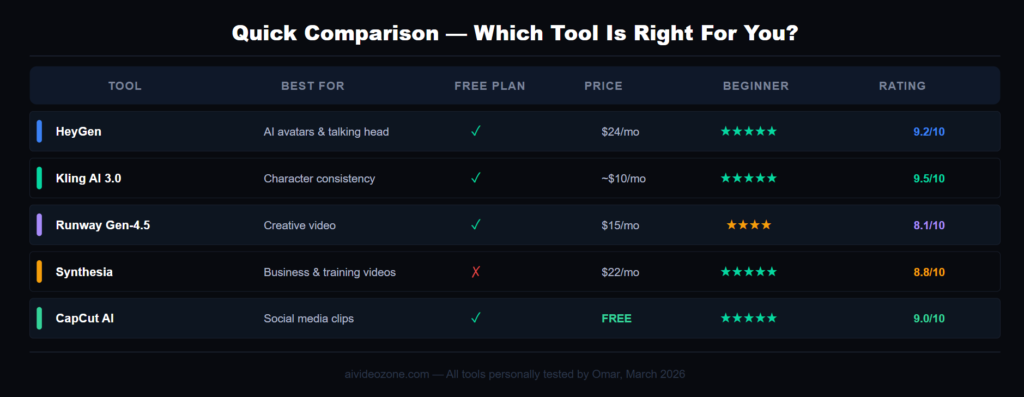
Plans from ~$12/monthQuick Comparison Table
 Important
Do not try to use all the AI tools at the same time. Choose one tool that fits what you need and learn it well for 30 days and then move on to another one. A big mistake that beginners make is jumping from one tool to another of becoming an expert, in one tool.
Frequent question
Which Tool Should You Start With?
After months of testing, here’s my honest recommendation based on your situation:
🆓 Zero budget → Start with CapCut AI
It’s free, easy, and gets you making real videos on day one. Once you’re comfortable, upgrade to a paid tool.
🎭 Want AI avatars → Start with HeyGen
The cleanest interface, the best free plan for testing, and the most beginner-friendly experience of any avatar tool I’ve tried.
🎬 Want cinematic character video → Start with Kling AI
The best character consistency at the most affordable price point. This is my personal daily driver for AI character work.
🏢 Creating business/training content → Go with Synthesia
More expensive but unmatched for professional presentations and multilingual business videos.
What's New in AI Video in 2026?
The landscape has developed fast this year. In 2025, people were asking if AI could make a video from a simple text or a simple picture. Now in 2026, people are starting to believe that AI can be developed, and right now the real challenge for most AI video creators is to keep the same character in every video, control the direct camera movements precisely, and build complete workflows without five different subscriptions.
The biggest trend is convergence: avatar platforms are adding cinematic video generation, while text-to-video tools are adding voice and presenter workflows. The category lines are blurring fast. By end of 2026, most top tools will have native audio generation built in as a standard feature.